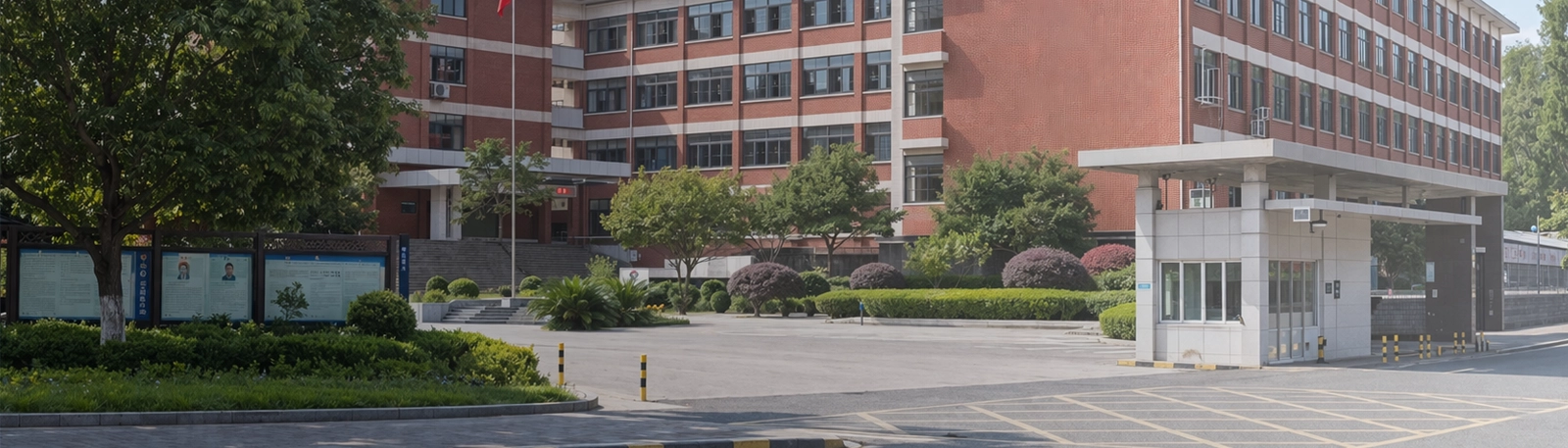
Uma escola não é uma única sala ou um único processo. É um ambiente vivo composto por salas de aula, escritórios administrativos, corredores, portões, dormitórios, bibliotecas, instalações desportivas, cantinas, áreas de estacionamento e espaços públicos abertos. Cada uma destas áreas tem diferentes padrões de movimento, diferentes níveis de supervisão e diferentes tipos de risco. Quando algo inesperado acontece, como uma emergência médica, um visitante agressivo, um conflito entre alunos, uma entrada não autorizada ou um evento de evacuação, os primeiros momentos são mais importantes do que qualquer outra coisa.
É por isso que um projeto de botão de pânico escolar nunca deve ser abordado como uma simples instalação de hardware. O requisito real é mais amplo. As escolas precisam de uma forma prática de reportar incidentes imediatamente, identificar onde estão a acontecer, comunicar com os respondedores, notificar as pessoas certas e coordenar as ações de acompanhamento sem confusão. Um botão pode iniciar o alerta, mas é o sistema de comunicação por trás desse botão que determina se a resposta é organizada, rápida e eficaz.
Uma solução moderna de botão de pânico e comunicação de emergência para escolas combina ativação de alarme com um toque, intercomunicador SIP, telefones IP, megafonia, notificação visual, ligação a CCTV e gestão centralizada numa única estrutura de segurança conectada. Em vez de depender de dispositivos isolados que funcionam separadamente, as escolas podem construir um fluxo de trabalho de resposta que suporte tanto o manuseio de incidentes rotineiros quanto as emergências de alta prioridade em todo o campus.
Quando ocorre um incidente no campus, o primeiro desafio muitas vezes não é se alguém consegue acionar um alarme. O problema real é se a escola consegue compreender o evento suficientemente rápido para responder bem. Um professor pode pressionar um botão de pânico, mas o posto de segurança ainda precisa de saber onde aconteceu, que tipo de situação está a desenrolar-se e quem deve responder primeiro. Se essa informação tiver de ser confirmada através de múltiplas chamadas telefónicas, verificações manuais ou funcionários a correr entre salas, perde-se um tempo precioso.
As escolas também operam como ambientes partilhados em vez de espaços de trabalho isolados. Um problema numa sala de aula pode afetar o corredor exterior. Um incidente no portão pode exigir contributos de guardas, administradores e pessoal próximo. Uma emergência médica durante uma atividade desportiva pode envolver a enfermeira escolar, professores e a segurança do campus ao mesmo tempo. Por causa disto, as escolas precisam de uma solução que ajude as pessoas a agir em conjunto, em vez de responder através de ferramentas desconectadas.
Muitos campi ainda dependem de uma mistura de telefones, rádios manuais, botões de alarme independentes, sistemas básicos de sonorização e plataformas de monitorização de vídeo separadas. Cada ferramenta pode ter um propósito, mas quando não estão ligadas, a resposta geral torna-se mais lenta e menos previsível. O pessoal pode receber apenas parte da informação. As equipas de segurança podem não saber a urgência do evento. Os administradores podem ser informados demasiado tarde. Em campi maiores, estas lacunas tornam-se ainda mais visíveis.
Uma solução integrada muda isto ao transformar a notificação de emergência num processo de comunicação estruturado. No momento em que um alerta é acionado, o sistema pode identificar a localização, notificar o pessoal responsável, estabelecer comunicação por voz, abrir as câmaras ligadas e suportar anúncios direcionados se for necessária uma notificação mais ampla. Isto melhora não só a eficiência técnica, mas também o lado humano da resposta, reduzindo a incerteza e ajudando o pessoal a manter-se mais calmo sob pressão.
Na segurança escolar, o objetivo não é simplesmente acionar um alarme. O objetivo é ajudar as pessoas certas a compreender o que está a acontecer, onde está a acontecer e como devem responder sem demora.
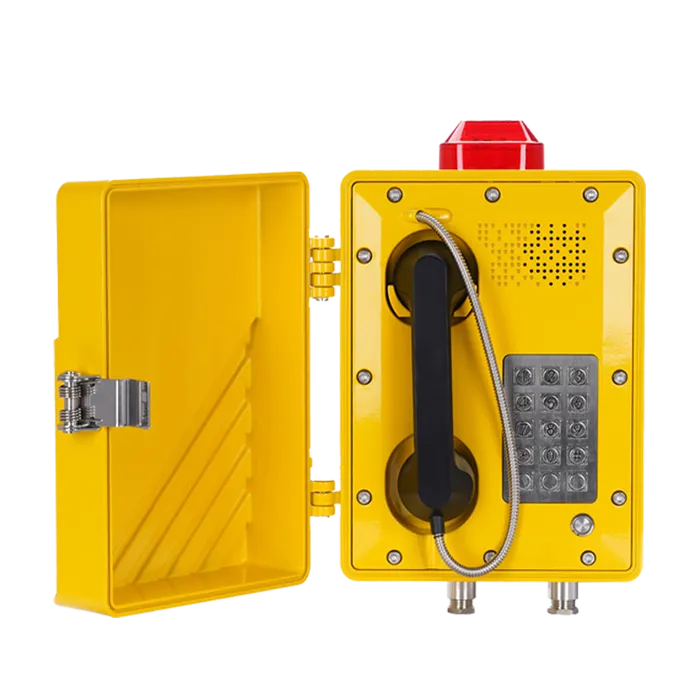
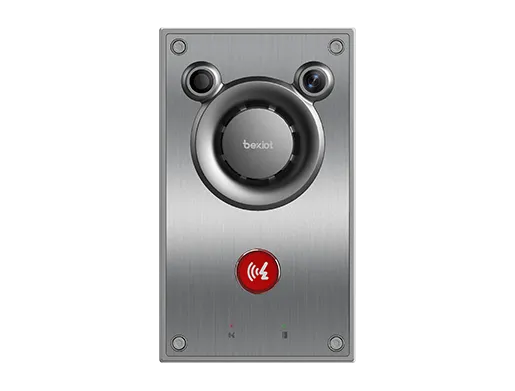
Uma solução de botão de pânico e comunicação de emergência para escolas é um sistema de segurança do campus concebido para suportar a notificação imediata de incidentes, comunicação em tempo real, notificação estruturada e gestão centralizada de respostas. Normalmente inclui botões de pânico em salas-chave, estações de chamada de emergência em áreas públicas, terminais de intercomunicador SIP, telefones IP em escritórios e salas de segurança, integração de megafonia, dispositivos de alarme visual, ligação a CCTV e uma plataforma de gestão que exibe e rastreia eventos ativos.
A solução é destinada a uma vasta gama de cenários, incluindo emergências médicas, sofrimento do pessoal, comportamento violento, acesso não autorizado, conflitos entre alunos, atividade suspeita, incidentes fora do horário escolar e eventos relacionados com evacuações. O seu propósito não é substituir os procedimentos de segurança escolar, mas tornar esses procedimentos mais fiáveis, fornecendo ao pessoal ferramentas de comunicação mais rápidas e uma consciência situacional mais clara.
Quando um botão de pânico ou ponto de chamada de emergência é ativado, o evento é enviado para a plataforma central e para os pontos finais de resposta designados, como o posto de segurança, o escritório administrativo, a sala de serviço ou os respondedores móveis. O alarme é associado a uma localização precisa, como um edifício, sala, portão, zona de corredor ou área exterior. Dependendo do projeto, o sistema também pode atribuir um nível de prioridade e acionar um fluxo de trabalho de resposta predefinido.
Se a verificação por voz estiver ativada, o pessoal pode abrir imediatamente uma comunicação bidirecional com o ponto de notificação através de um intercomunicador SIP ou terminal ligado. Se a integração de vídeo estiver disponível, as câmaras relacionadas podem ser exibidas automaticamente para ajudar os respondedores a compreender a situação antes da chegada. Se o evento exigir uma comunicação mais ampla, o sistema de megafonia pode ser usado para enviar instruções para um edifício, piso ou zona específica do campus. Desta forma, o alarme torna-se o primeiro passo numa resposta coordenada, em vez de um aviso isolado.
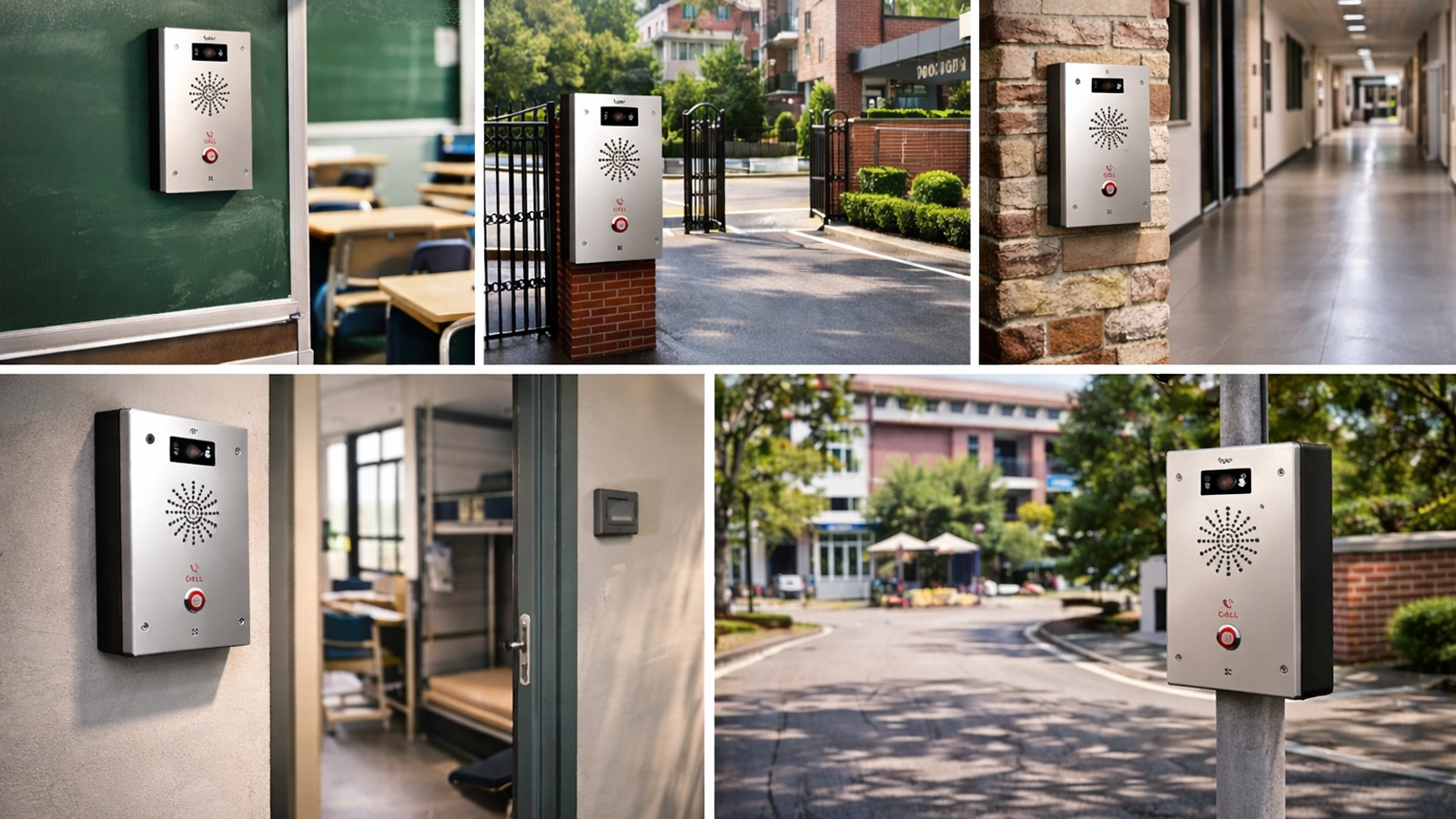
Os botões de pânico podem ser instalados em salas de aula, escritórios administrativos, enfermarias, salas de aconselhamento, balcões de receção, laboratórios, bibliotecas e áreas de gestão de dormitórios. Em algumas localizações, o botão é visível e destinado a uso direto. Noutras, especialmente em balcões virados para o público ou áreas mais sensíveis, pode ser concebido para permanecer discreto, embora ainda seja fácil de alcançar pelo pessoal autorizado.
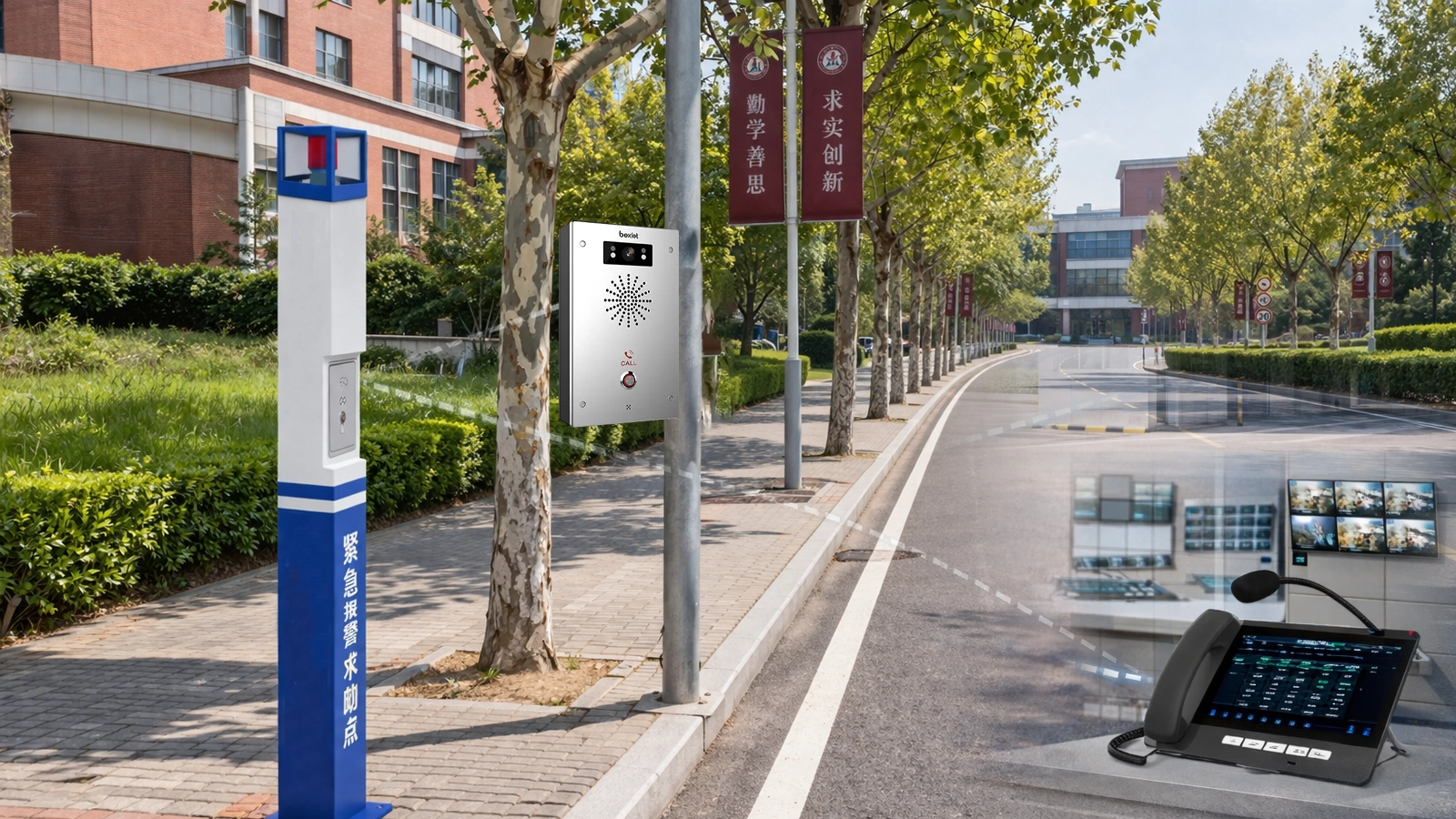
As estações de chamada de emergência podem ser colocadas em portões, entradas, passadiços exteriores, corredores, patamares de escadas, zonas de estacionamento e pontos de acesso a parques infantis. Estes dispositivos são especialmente úteis em áreas onde alguém pode precisar de ajuda imediata, mas pode não estar perto de um escritório com pessoal. Eles fornecem não apenas uma forma rápida de levantar um alerta, mas também um caminho de comunicação direto para o pessoal de segurança ou administração.
A ativação com um toque é importante, mas por si só não explica o que está a acontecer. A comunicação por voz adiciona esse contexto em falta. Os terminais de intercomunicador SIP, os pontos de comunicação nas salas de aula e os telefones IP em escritórios ou salas de controlo permitem à escola confirmar a natureza de um incidente, acalmar as pessoas envolvidas e orientar o passo seguinte de forma mais eficaz.
Como estes dispositivos operam através de uma rede IP, podem tornar-se parte de um sistema de comunicação mais amplo do campus, em vez de permanecerem fechados dentro de um subsistema separado. Isto ajuda o pessoal de segurança, administradores, pessoal dos portões e respondedores designados a trabalhar dentro de uma estrutura partilhada. Também facilita futuras expansões quando a escola adiciona edifícios, departamentos ou até campi adicionais.
Alguns incidentes exigem um manuseio silencioso e uma coordenação cuidadosa. Outros exigem notificação imediata numa área mais ampla. A integração com sistemas de megafonia ou sonorização permite às escolas entregar instruções, mensagens de confinamento, avisos de evacuação ou orientações operacionais para zonas selecionadas ou para todo o campus, quando necessário. Esta flexibilidade é importante porque nem todos os alarmes devem desencadear a mesma resposta pública.
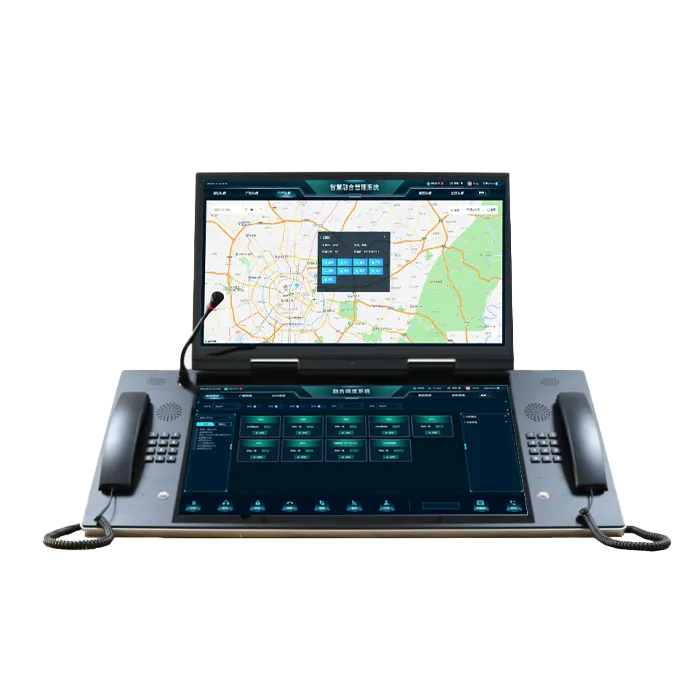
Os dispositivos de notificação visual, como balizas, luzes estroboscópicas ou indicadores locais, podem apoiar a consciencialização em ambientes ruidosos ou lotados onde a voz por si só pode não ser suficiente. No centro do sistema, a plataforma de gestão oferece ao pessoal uma visão unificada dos alarmes ativos, localizações, estado dos dispositivos e ações de resposta, facilitando a gestão do evento a partir de um só lugar e a manutenção de um registo operacional claro.
Botões de pânico para salas de aula, escritórios, áreas de receção e locais sensíveis
Estações de chamada de emergência para portões, corredores, espaços exteriores e áreas públicas
Terminais de intercomunicador SIP para comunicação bidirecional de voz em tempo real
Telefones IP para escritórios administrativos, enfermarias e postos de segurança
Integração de megafonia e sonorização para anúncios de emergência
Dispositivos de alarme visual para aviso local e rápido reconhecimento
Ligação a CCTV para verificação de incidentes e melhor consciência situacional
Software centralizado para monitorização, escalonamento, registo de eventos e coordenação
O primeiro papel do sistema é permitir que o pessoal reporte um incidente sem hesitação. Numa sala de aula, escritório ou portaria, pressionar um botão é muitas vezes mais prático do que procurar um número, explicar a situação sob stress ou sair do local para procurar ajuda. O sistema também pode ser configurado para que alarmes de diferentes localizações sigam diferentes fluxos de trabalho, dependendo da sua função e nível de risco.
Por exemplo, um botão de pânico na receção principal pode desencadear um processo focado na segurança, enquanto um alerta da enfermaria pode ser encaminhado primeiro para a administração e para o pessoal de apoio no local. Este tipo de configuração flexível torna a solução muito mais útil do que um projeto de alarme uniforme que trata todas as localizações da mesma maneira.
Uma vez recebido um alarme, os respondedores precisam de compreender a situação o mais rapidamente possível. A voz bidirecional pode fazer uma grande diferença aqui. Um professor pode explicar que um aluno desmaiou, que um visitante está a comportar-se agressivamente, ou que foi notado fumo perto de uma escada. Um membro do pessoal do portão pode confirmar se uma pessoa não autorizada ainda está no local. Estes detalhes ajudam os respondedores a escolher a ação correta imediatamente.
A comunicação por voz também é valiosa porque reduz as suposições. Em vez de tratar cada alerta como desconhecido, a escola pode avaliar o evento com mais precisão e responder com a combinação apropriada de apoio de segurança, médico, administrativo ou de instalações.
A precisão da localização é essencial em qualquer incidente no campus. Uma equipa de resposta não pode perder tempo a perguntar se o evento é no Edifício A ou no Edifício C, no segundo andar ou no rés-do-chão, dentro de uma sala de aula ou lá fora perto da entrada. Portanto, cada botão de pânico e ponto de comunicação deve estar associado a uma sala, escritório, portão, zona ou área pública claramente definida.
A plataforma central deve apresentar esta informação de forma clara e consistente, para que o pessoal saiba exatamente para onde ir. Em campi maiores, os pontos finais podem ser agrupados por edifício, piso, departamento ou setor exterior, o que ajuda não só durante emergências, mas também na manutenção, revisão de eventos e gestão operacional diária.
As escolas precisam da capacidade de comunicar para além do ponto onde o alarme foi levantado. A integração de megafonia permite ao pessoal enviar anúncios ao vivo ou pré-gravados para edifícios, pisos ou para todo o campus selecionados, dependendo do tipo de evento. Isto pode suportar medidas de confinamento, orientação de evacuação, instruções relacionadas com o clima ou comunicações operacionais mais amplas durante uma situação em evolução.
Igualmente importante, a megafonia baseada em zonas ajuda as escolas a evitar perturbações desnecessárias. Nem todos os eventos devem tornar-se um anúncio para todo o campus. Um bom sistema permite à escola isolar uma área problemática, notificar apenas as zonas relevantes e manter o resto do campus a funcionar tão normalmente quanto possível.
Durante as horas escolares ocupadas, um único evento pode envolver professores, guardas, pessoal administrativo, enfermeiros, conselheiros e pessoal de manutenção. Sem um processo de gestão estruturado, passos importantes podem ser perdidos. Uma plataforma centralizada ajuda a organizar a resposta, mostrando quem foi notificado, se o alarme foi reconhecido e se precisa de escalonamento.
Se o primeiro respondedor designado não atender dentro de um tempo definido, o sistema pode encaminhar o evento para um supervisor ou equipa de reserva. Se múltiplos alarmes ocorrerem ao mesmo tempo, a plataforma pode ajudar o pessoal a priorizá-los por gravidade e localização. Isto torna o processo de resposta mais fiável e mais fácil de avaliar posteriormente.
Um membro do pessoal ou utilizador autorizado ativa um botão de pânico ou ponto de chamada de emergência.
O sistema identifica a sala, edifício, portão ou zona exatos.
A segurança, administração ou respondedores designados recebem o alerta imediatamente.
A comunicação por voz bidirecional e o vídeo ligado podem ser abertos se necessário.
Anúncios direcionados ou notificações visuais são ativados quando apropriado.
O evento é reconhecido, gerido e registado através da plataforma.
Se a resposta for atrasada, o alarme escala automaticamente.
Os bons sistemas de segurança escolar não reagem simplesmente a alarmes. Eles criam um caminho claro do alerta à ação, ajudando o pessoal a manter-se organizado mesmo quando a situação em si é stressante.
As salas de aula continuam a ser uma das áreas de implementação mais importantes, porque são onde os professores têm a responsabilidade diária pela segurança dos alunos. Num evento médico, incidente comportamental, preocupação de segurança ou perturbação súbita, o professor precisa de uma forma rápida e fiável de solicitar ajuda sem sair da sala.
Os edifícios de ensino também incluem corredores, patamares de escadas, escritórios de pessoal e salas polivalentes, todos os quais podem fazer parte do mesmo cenário de incidente. Assim, um projeto de sistema bem pensado considera todo o edifício como um ambiente operacional, em vez de tratar cada sala de aula como um ponto separado e isolado.
As entradas das escolas são muitas vezes onde os problemas de segurança aparecem primeiro. A gestão de visitantes, o acesso de entregas, a pressão da saída dos alunos, a entrada fora de horas e as tentativas de acesso não autorizado criam riscos. Os botões de pânico e pontos de ajuda nos portões, balcões de receção e postos de segurança permitem ao pessoal da linha da frente reportar preocupações imediatamente e, quando necessário, estabelecer comunicação direta com a sala de controlo.
Estas áreas beneficiam particularmente da ligação a CCTV, porque o vídeo dá às equipas de segurança e administração uma confirmação visual imediata do que está a acontecer. Essa visibilidade suporta uma tomada de decisão mais rápida e mais confiante.
Nos campi com alojamento para estudantes, as necessidades de comunicação continuam muito depois do fim do dia escolar. Os dormitórios, entradas, salas comuns e escritórios do pessoal residente requerem formas fiáveis de reportar problemas médicos, problemas de comportamento, perturbações fora de horas e eventos relacionados com incêndios. Como o pessoal pode ser mais reduzido à noite, a notificação clara e o escalonamento tornam-se ainda mais importantes.
Nestes ambientes, a voz bidirecional e a megafonia direcionada são especialmente úteis porque permitem ao pessoal residente avaliar rapidamente o evento e coordenar com os administradores ou pessoal de segurança sem demora.
Os espaços partilhados criam um tipo diferente de desafio porque envolvem grupos maiores, ocupação variável e movimento mais aberto. Um desmaio de um aluno numa cantina, um conflito numa biblioteca, uma lesão num campo desportivo ou uma preocupação de segurança durante um evento no campus exigem uma notificação rápida e um acompanhamento coordenado. As estações de chamada de emergência, os pontos de ajuda exteriores e as ferramentas de comunicação ligadas facilitam a gestão eficaz destes espaços.
Como estas áreas podem afetar muitas pessoas ao mesmo tempo, também beneficiam de opções de notificação de área alargada controladas. Nalguns casos, a resposta local é suficiente. Noutros, podem ser necessárias instruções públicas para preservar a ordem e guiar o movimento em segurança.
A integração de vídeo é uma das extensões mais práticas de uma solução de comunicação de emergência escolar. Quando um alerta é acionado, os operadores podem visualizar automaticamente as câmaras associadas à sala, entrada ou zona envolvida. Isto ajuda a confirmar se o evento parece ser um incidente médico, uma confrontação, um problema com um visitante ou uma preocupação de segurança mais ampla.
Em ambientes escolares, essa visibilidade adicional reduz a incerteza. Os respondedores podem preparar-se mais adequadamente antes de chegar, e os administradores podem determinar se são necessárias medidas mais amplas, incluindo serviços de emergência externos ou notificação para todo o campus.
As emergências escolares raramente são geridas por uma única pessoa. O pessoal de segurança pode lidar com a resposta imediata, mas os administradores podem precisar de gerir a comunicação de acompanhamento, o movimento dos alunos, o contacto com os pais ou a coordenação com o corpo docente. Uma plataforma unificada permite que diferentes funções trabalhem com a mesma informação do evento, respeitando ainda as responsabilidades operacionais e os níveis de acesso.
Este tipo de coordenação reduz a duplicação e a confusão. Em vez de juntar relatórios separados de diferentes sistemas, a escola pode operar a partir de uma única imagem partilhada do evento.
Uma implementação bem-sucedida depende de quão bem o sistema se adapta à vida real da escola. A colocação dos dispositivos deve refletir os padrões de movimento diários, as lacunas de supervisão, os escritórios de maior risco, os pontos de acesso público e os casos de uso fora de horas. Os fluxos de trabalho de alarme devem ser projetados antecipadamente para que o pessoal saiba quem recebe cada tipo de alerta, como os eventos são categorizados e quando devem ocorrer anúncios ou escalonamentos.
Na prática, muitas escolas também procuram um parceiro de solução que possa combinar dispositivos de comunicação, lógica de alarme e gestão centralizada numa estrutura prática. A Becke Telcom apoia campi com projetos integrados que reúnem botões de pânico, intercomunicador SIP, telefones IP, megafonia, alertas visuais, ligação a CCTV e software de gestão de acordo com a disposição e as necessidades de resposta do local. Para escolas que desejam melhorar a segurança sem adicionar complexidade desnecessária, esse tipo de abordagem unificada é muitas vezes muito mais sustentável do que juntar sistemas separados ao longo do tempo.
O benefício mais visível é a velocidade. A ativação de alarme com um toque encurta o tempo entre a descoberta do incidente e o início da resposta. A exibição e notificação automatizadas da localização reduzem o tempo gasto a confirmar onde está o evento e quem deve ir primeiro. A integração de voz e vídeo reduz a incerteza, permitindo que os respondedores cheguem mais bem preparados.
Para o pessoal escolar, isto faz mais do que melhorar o desempenho em emergências. Também constrói confiança no próprio processo de segurança. Professores, guardas e administradores são mais propensos a agir com decisão quando sabem que o sistema de comunicação por trás deles é fiável.
Cada campus inclui pessoas com diferentes funções, idades e vulnerabilidades. Os alunos precisam de proteção. Os professores precisam de uma forma rápida de solicitar ajuda. O pessoal de escritório pode precisar de alertas discretos numa situação virada para o público. Os visitantes precisam de acesso a pontos de ajuda em áreas comuns. Um sistema de comunicação de emergência integrado suporta todas estas necessidades sem forçar a escola a depender de uma miscelânea de ferramentas não relacionadas.
Como a solução pode ser adaptada por zona e tipo de evento, fortalece a segurança do campus enquanto respeita o ritmo normal da vida escolar.
Após um incidente, as escolas muitas vezes precisam de rever o que aconteceu, como foi reportado, quem foi notificado e se os procedimentos foram seguidos. Um sistema centralizado fornece registos de eventos, confirmações e histórico que suportam a revisão interna e a melhoria contínua. Isto é valioso para administradores que desejam fortalecer a segurança do campus ao longo do tempo, em vez de apenas reagir a eventos isolados.
Também ajuda as equipas de manutenção e técnicas porque o estado dos dispositivos, o mapeamento de zonas e os registos de eventos são mais fáceis de gerir quando a solução está organizada como um sistema conectado.
Notificação mais rápida de incidentes a partir de salas de aula, escritórios e áreas públicas
Identificação clara da sala e zona para os respondedores
Melhor comunicação entre segurança, administração e pessoal
Suporte para anúncios direcionados e notificação mais ampla do campus
Consciência situacional melhorada através da ligação de voz e vídeo
Manuseio de escalonamento e acompanhamento mais consistente
Implementação escalável em múltiplos edifícios ou campi
Registos de eventos fiáveis para revisão e melhoria da segurança
Uma solução de botão de pânico e comunicação de emergência para escolas deve ser entendida como um fluxo de trabalho de resposta completo do campus, em vez de uma simples coleção de dispositivos de alarme. O seu propósito é ajudar as escolas a reportar incidentes rapidamente, identificar localizações com precisão, comunicar claramente e coordenar a resposta em salas de aula, portões, escritórios, dormitórios e áreas públicas. Quando estas capacidades estão ligadas, o campus fica melhor preparado não só para grandes emergências, mas também para as situações quotidianas que exigem uma ação calma e imediata.
Ao combinar alertas com um toque, intercomunicador SIP, telefones IP, megafonia, alarmes visuais, ligação a CCTV e gestão centralizada, as escolas podem construir um ambiente de segurança mais reativo, mais fácil de gerir e mais adequado às operações reais do campus. Para escolas que planeiam fortalecer a comunicação, acelerar o manuseio de incidentes e melhorar a coordenação em múltiplas áreas, a Becke Telcom pode suportar uma solução personalizada construída em torno das reais necessidades do local e dos requisitos de resposta diários.
O principal objetivo é permitir que o pessoal ou utilizadores autorizados reportem emergências imediatamente e acionem um fluxo de trabalho de comunicação coordenado. Um sistema bem concebido faz mais do que enviar um alarme. Também ajuda a identificar a localização, notificar os respondedores e apoiar ações de acompanhamento.
Sim. Uma solução escolar moderna pode integrar botões de pânico com terminais de intercomunicador SIP, pontos de comunicação nas salas de aula e telefones IP, para que os respondedores possam verificar a situação e coordenar ações através de comunicação por voz em tempo real.
Sim. O sistema pode ser ligado a plataformas de megafonia ou sonorização escolar para que o pessoal possa entregar mensagens ao vivo ou pré-gravadas para zonas selecionadas ou para todo o campus, dependendo do tipo de incidente.
Em muitos casos, sim. A ligação a CCTV ajuda a segurança e os administradores a verificar visualmente um incidente, a compreender o ambiente ao seu redor e a tomar decisões de resposta mais rápidas e mais informadas.
As áreas de implementação comuns incluem salas de aula, escritórios administrativos, entradas, portões, enfermarias, áreas de receção, bibliotecas, escritórios de dormitórios, corredores, zonas desportivas e outros espaços públicos ou de maior risco do campus.
Sim. Com software centralizado e arquitetura baseada em IP, o sistema pode monitorizar e gerir alarmes em múltiplos edifícios ou locais, mantendo regras de resposta e visibilidade consistentes.