
Como atualizar a estação interna i5xW no modo POST?

Introdução1.

1.1. Visão geral

 As estações internas da série i5xW podem exigir atualizações de firmware para atender a necessidades específicas ou corrigir determinados bugs. A seguir, detalha-se como atualizar as estações internas da série i5xW no modo POST.

1.2. Modelos aplicáveis

 Estações internas da série i5xW: i51W, i52W, i53W.

1.3. Pré-requisitos

① Uma estação interna da série i5xW (aqui usando o i52W como exemplo), um switch PoE (ou uma fonte de alimentação CC). Conecte o dispositivo ao switch.
② Um computador para depuração; conecte o computador ao mesmo switch, garantindo que a rede entre o computador e o dispositivo esteja acessível.

1.4. Diagrama de conexão do dispositivo e do computador

① Conecte o i52W ao switch e o computador ao mesmo switch. Certifique-se de que a rede entre o computador e o switch esteja acessível. O diagrama de conexão é mostrado na Figura 1.
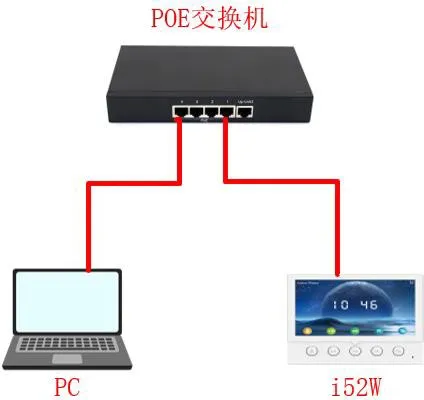
Diagrama de conexão do dispositivo e do computador
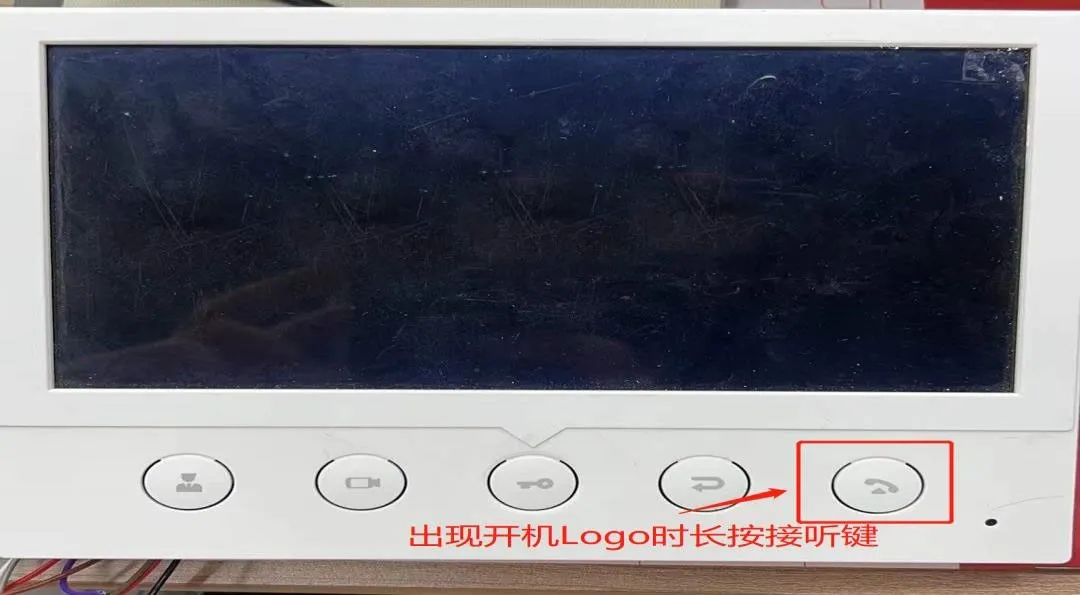
            Figura 1 Diagrama de conexão do dispositivo e do computador
Atualizando a estação interna i5xW no modo POST2.

Para atualizar no modo POST, o i5xW deve primeiro entrar no modo POST e, em seguida, um computador acessa a interface web POST do dispositivo para realizar a atualização. Usando o i52W como exemplo, a seguir são detalhadas as etapas de atualização no modo POST para o i5xW.

2.1. Entrando no modo POST

(1) Após ligar o i52W, quando o logotipo de inicialização aparecer, pressione longamente o botão de atender, conforme mostrado na Figura 2.
Como entrar no modo POST no i52W
                                                                                                           Figura 2 Como entrar no modo POST no i52W
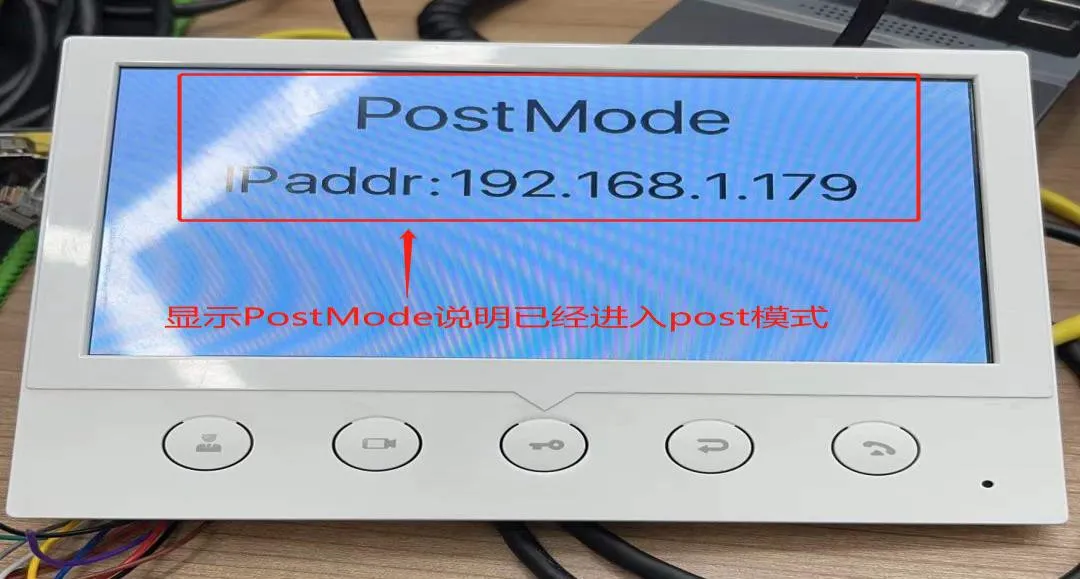
(2) Quando a interface PostMode aparecer, isso indica que o i52W entrou com sucesso no modo POST, conforme mostrado na Figura 3.
i52W entrou com sucesso no modo POST
                                                                                                      Figura 3 i52W entrou com sucesso no modo POST

 2.2. Atualizando o firmware no modo POST

Após o dispositivo entrar no modo POST, é necessário configurá-lo através da interface web POST. As etapas detalhadas são as seguintes.
(1) Acesse a interface web POST: Digite http://192.168.1.179:8080 no navegador para abrir a interface web POST.
(2) Execute a atualização: Na interface web POST, selecione "Upgrade Software", depois escolha o arquivo de firmware correspondente e clique em "Upgrade" para iniciar a atualização, conforme mostrado na Figura 4.
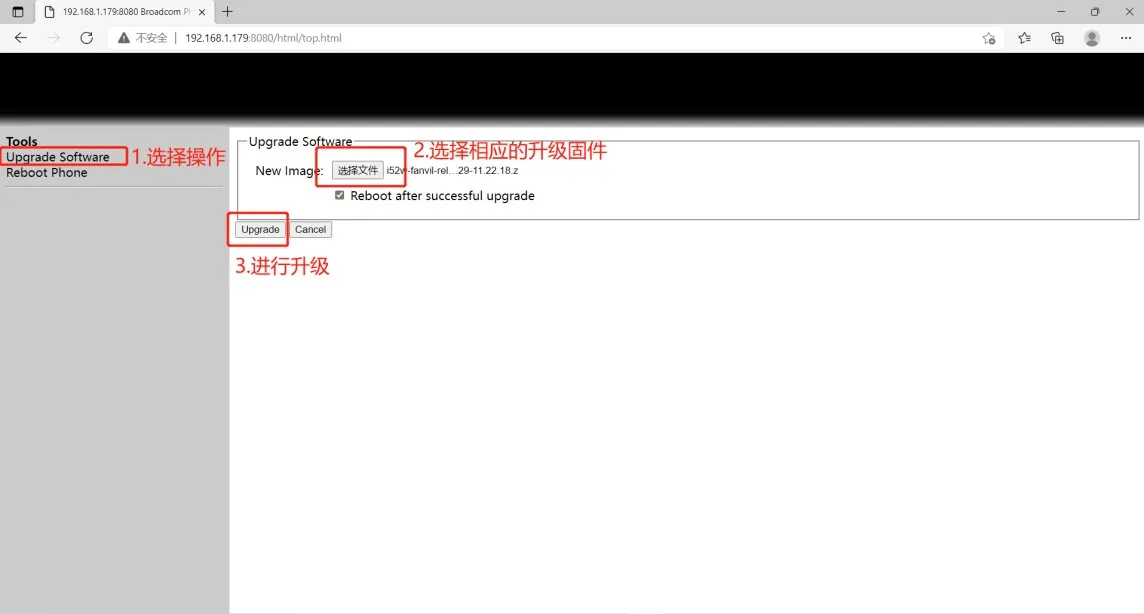
Configuração da interface web POST 
                                                                                                             Figura 4 Configuração da interface web POST
(3) Aguarde a conclusão da atualização; o dispositivo será reiniciado automaticamente.
(4) Verifique se a versão do firmware foi atualizada para a versão de destino. Caso contrário, você pode atualizar novamente; se sim, a atualização foi bem-sucedida.
O texto acima descreve o processo de atualização POST para as estações internas da série i5xW.

Catálogo
Atendimento ao cliente Telefone
We use cookie to improve your online experience. By continuing to browse this website, you agree to our use of cookie.

Cookies

This Cookie Policy explains how we use cookies and similar technologies when you access or use our website and related services. Please read this Policy together with our Terms and Conditions and Privacy Policy so that you understand how we collect, use, and protect information.

By continuing to access or use our Services, you acknowledge that cookies and similar technologies may be used as described in this Policy, subject to applicable law and your available choices.

Updates to This Cookie Policy

We may revise this Cookie Policy from time to time to reflect changes in legal requirements, technology, or our business practices. When we make updates, the revised version will be posted on this page and will become effective from the date of publication unless otherwise required by law.

Where required, we will provide additional notice or request your consent before applying material changes that affect your rights or choices.

What Are Cookies?

Cookies are small text files placed on your device when you visit a website or interact with certain online content. They help websites recognize your browser or device, remember your preferences, support essential functionality, and improve the overall user experience.

In this Cookie Policy, the term “cookies” also includes similar technologies such as pixels, tags, web beacons, and other tracking tools that perform comparable functions.

Why We Use Cookies

We use cookies to help our website function properly, remember user preferences, enhance website performance, understand how visitors interact with our pages, and support security, analytics, and marketing activities where permitted by law.

We use cookies to keep our website functional, secure, efficient, and more relevant to your browsing experience.

Categories of Cookies We Use

Strictly Necessary Cookies

These cookies are essential for the operation of the website and cannot be disabled in our systems where they are required to provide the service you request. They are typically set in response to actions such as setting privacy preferences, signing in, or submitting forms.

Without these cookies, certain parts of the website may not function correctly.

Functional Cookies

Functional cookies enable enhanced features and personalization, such as remembering your preferences, language settings, or previously selected options. These cookies may be set by us or by third-party providers whose services are integrated into our website.

If you disable these cookies, some services or features may not work as intended.

Performance and Analytics Cookies

These cookies help us understand how visitors use our website by collecting information such as traffic sources, page visits, navigation behavior, and general interaction patterns. In many cases, this information is aggregated and does not directly identify individual users.

We use this information to improve website performance, usability, and content relevance.

Targeting and Advertising Cookies

These cookies may be placed by our advertising or marketing partners to help deliver more relevant ads and measure the effectiveness of campaigns. They may use information about your browsing activity across different websites and services to build a profile of your interests.

These cookies generally do not store directly identifying personal information, but they may identify your browser or device.

First-Party and Third-Party Cookies

Some cookies are set directly by our website and are referred to as first-party cookies. Other cookies are set by third-party services, such as analytics providers, embedded content providers, or advertising partners, and are referred to as third-party cookies.

Third-party providers may use their own cookies in accordance with their own privacy and cookie policies.

Information Collected Through Cookies

Depending on the type of cookie used, the information collected may include browser type, device type, IP address, referring website, pages viewed, time spent on pages, clickstream behavior, and general usage patterns.

This information helps us maintain the website, improve performance, enhance security, and provide a better user experience.

Your Cookie Choices

You can control or disable cookies through your browser settings and, where available, through our cookie consent or preference management tools. Depending on your location, you may also have the right to accept or reject certain categories of cookies, especially those used for analytics, personalization, or advertising purposes.

Please note that blocking or deleting certain cookies may affect the availability, functionality, or performance of some parts of the website.

Restricting cookies may limit certain features and reduce the quality of your experience on the website.

Cookies in Mobile Applications

Where our mobile applications use cookie-like technologies, they are generally limited to those required for core functionality, security, and service delivery. Disabling these essential technologies may affect the normal operation of the application.

We do not use essential mobile application cookies to store unnecessary personal information.

How to Manage Cookies

Most web browsers allow you to manage cookies through browser settings. You can usually choose to block, delete, or receive alerts before cookies are stored. Because browser controls vary, please refer to your browser provider’s support documentation for details on how to manage cookie settings.

Contact Us

If you have any questions about this Cookie Policy or our use of cookies and similar technologies, please contact us at support@becke.cc .