

Não Perturbe, frequentemente abreviado como DND, é um recurso de comunicação que permite que um usuário ou terminal bloqueie temporariamente chamadas recebidas, alertas ou notificações sem desconectar o dispositivo da rede. Ele é usado em telefones de mesa, telefones IP, sistemas PBX, dispositivos móveis, plataformas de interfone, comunicações unificadas e ambientes de comunicação hoteleira.
Na prática, o DND ajuda a evitar interrupções durante reuniões, trabalho focado, períodos de descanso, conversas confidenciais, atendimento médico ou outras situações em que chamadas e alertas seriam inconvenientes. Em vez de desligar o dispositivo ou remover a linha do sistema, o usuário mantém o terminal registrado e operacional enquanto controla como as comunicações recebidas serão tratadas.
Não Perturbe é um recurso de controle de chamadas que preserva a conectividade enquanto evita interrupções desnecessárias.
Entendendo o significado de Não Perturbe
Não Perturbe é uma função de presença e tratamento de chamadas
Em sua essência, o recurso altera a forma como um endpoint de comunicação responde a atividades recebidas. Quando o DND está ativado, o dispositivo ou a conta do usuário continua ativo no sistema, mas as chamadas recebidas podem ser recusadas, silenciadas, redirecionadas ou enviadas diretamente para o correio de voz, dependendo do projeto do sistema.
Isso diferencia o DND de um estado offline. Um dispositivo offline pode estar inacessível por perda de rede, desligamento ou falha de registro. Um dispositivo em modo Não Perturbe continua fazendo parte do sistema de comunicação, mas foi configurado intencionalmente para não tocar ou notificar o usuário da maneira normal.
O recurso é usado em comunicação pessoal e empresarial
Muitas pessoas conhecem o Não Perturbe pelos smartphones, onde ele silencia chamadas e notificações durante o sono, reuniões ou viagens. Em sistemas profissionais, porém, o DND também é um recurso importante de telefonia e operação. Ele ajuda a controlar interrupções em escritórios executivos, recepções, hotéis, postos de enfermagem, salas de controle e espaços de trabalho compartilhados.
Como pode ser aplicado no nível do dispositivo, ramal ou perfil do usuário, o DND é flexível o suficiente para uso individual e para políticas de comunicação corporativa.
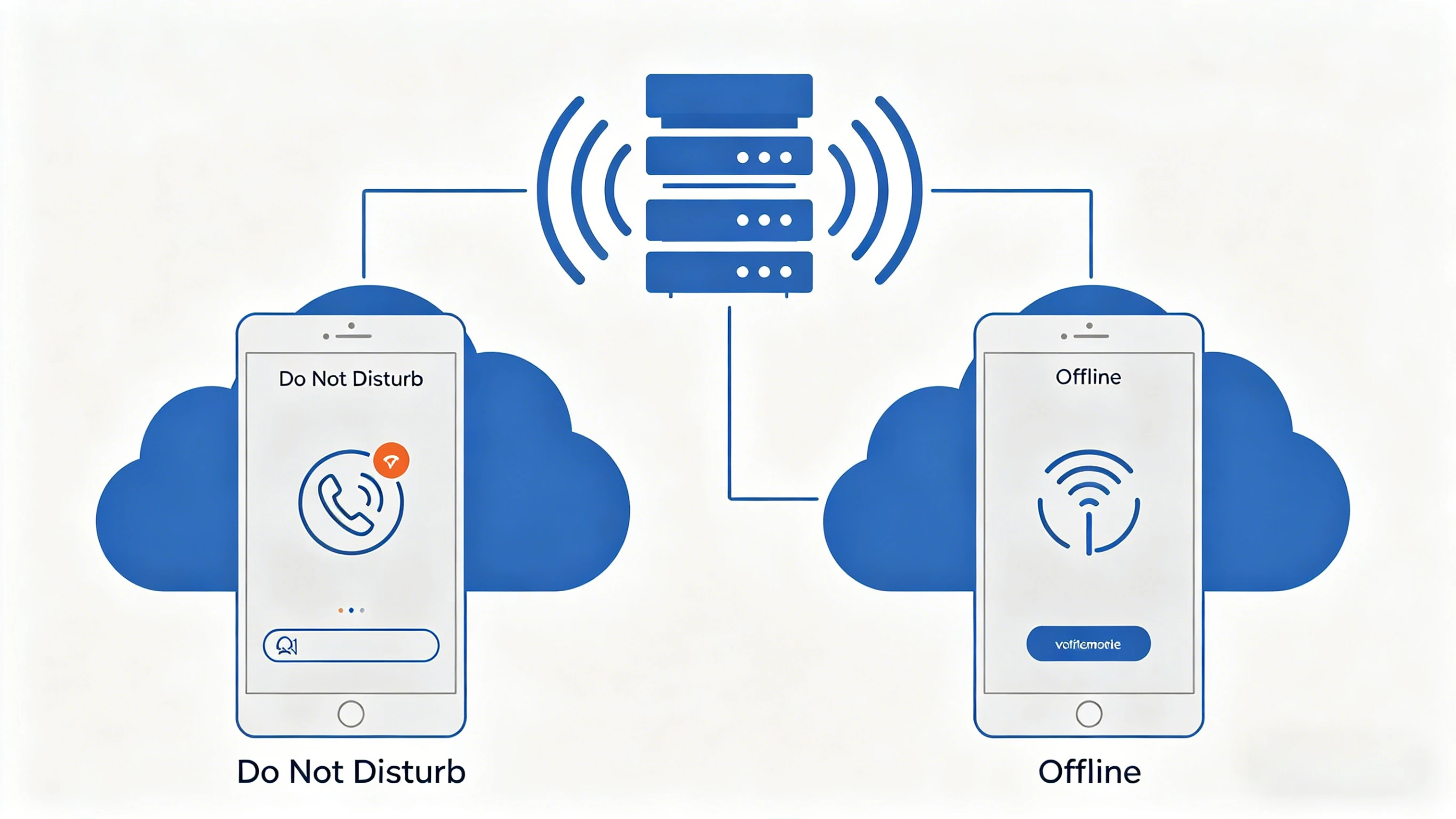
Não Perturbe permite que um endpoint permaneça conectado enquanto reduz ou bloqueia interrupções.
Como o Não Perturbe funciona
O sistema altera a resposta às chamadas recebidas
Quando o DND é ativado, a plataforma aplica uma regra diferente ao tráfego de entrada. Em alguns sistemas, o telefone não toca e o chamador recebe indicação de ocupado ou tratamento de não atendimento. Em outros, a chamada é automaticamente encaminhada para correio de voz, recepcionista, outro ramal ou grupo de atendimento.
O comportamento exato depende da configuração do PBX, servidor SIP, plataforma UC ou sistema operacional móvel. Alguns sistemas também permitem agendas de DND, para que o recurso seja ativado automaticamente em períodos definidos.
Notificações visuais e sonoras geralmente são suprimidas
Além de controlar o roteamento de chamadas, o DND normalmente suprime toque audível e avisos visuais. Em telefones IP e de mesa, um ícone DND, estado de tecla ou mensagem no display pode indicar que as chamadas estão sendo filtradas. Em clientes de software, o estado pode aparecer no indicador de presença.
Esse estado visível é importante porque mostra a colegas e administradores que o ramal está disponível na rede, mas protegido intencionalmente contra interrupções.
O DND pode ser local, baseado em conta ou gerenciado centralmente
Algumas funções são ativadas diretamente no dispositivo, como ao pressionar uma tecla DND no telefone IP. Outras são gerenciadas pela conta do usuário no PBX ou na plataforma de comunicações unificadas. Em empresas, administradores também podem configurar ou impor regras de DND por políticas, agendamento ou software de gerenciamento de chamadas.
Esse desenho em camadas torna o recurso adequado para pequenos escritórios, plataformas em nuvem, sistemas hoteleiros e grandes implantações empresariais.
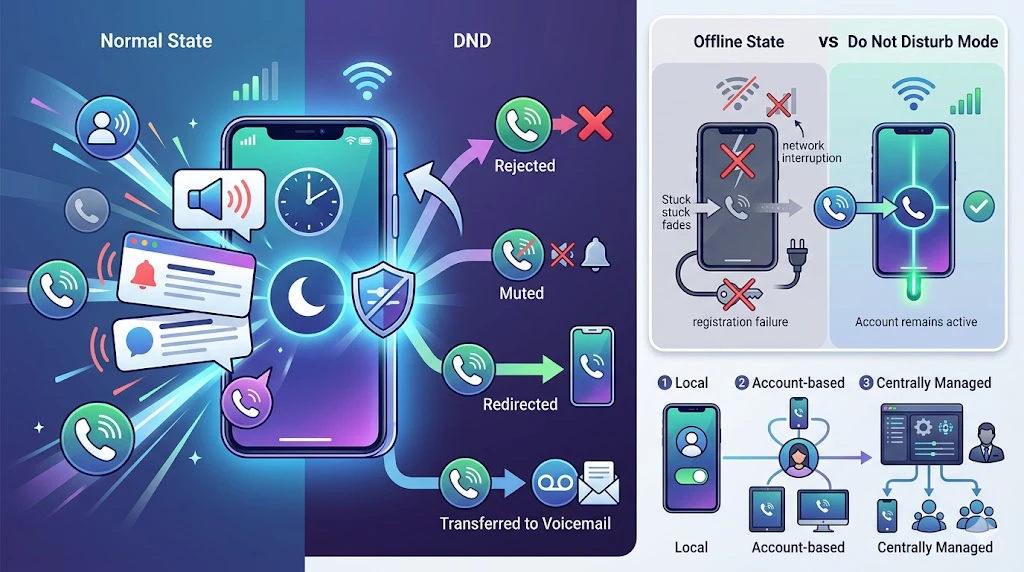
O Não Perturbe muda o tratamento das chamadas recebidas sem desconectar o usuário do sistema.
Principais recursos do Não Perturbe
Bloqueio ou rejeição de chamadas
Um dos recursos básicos é impedir que o endpoint toque quando uma nova chamada chega. O sistema pode rejeitar silenciosamente a chamada, retornar ocupado ou aplicar outra regra predefinida. Assim, o usuário mantém o foco sem atender ou dispensar chamadas manualmente uma por uma.
Em ambientes empresariais, isso é útil para executivos, operadores, profissionais de saúde e pessoas em tarefas confidenciais ou sensíveis ao tempo.
Integração com correio de voz ou encaminhamento
Muitos sistemas combinam DND com correio de voz ou lógica de encaminhamento. Em vez de simplesmente bloquear a chamada, o PBX pode transferir o chamador para correio de voz, assistente, sala de plantão, service desk ou outro destino interno. Isso evita que chamadas importantes sejam perdidas quando o usuário principal não pode ser interrompido.
Essa integração torna o DND mais útil do que um simples modo silencioso, pois mantém a continuidade da comunicação e protege a atenção do usuário.
Indicação de status e presença
Plataformas modernas costumam mostrar o status DND como parte da presença. Colegas podem ver que o usuário está em Não Perturbe e evitar tentativas desnecessárias. Isso reduz chamadas repetidas sem sucesso e melhora a disciplina de comunicação.
Em sistemas SIP e UC, presença e DND trabalham juntos para indicar disponibilidade com mais precisão.
Ativação programada e baseada em regras
Alguns sistemas permitem ativar o DND por horários, modos de trabalho, calendário ou políticas. Por exemplo, ele pode entrar automaticamente durante reuniões recorrentes, horário noturno, mudanças de turno ou períodos de tratamento em saúde.
A operação baseada em regras torna o recurso previsível e reduz a necessidade de alternância manual durante o dia.
Um bom projeto de Não Perturbe não serve apenas para bloquear chamadas. Ele gerencia interrupções sem perder o controle da comunicação.
Benefícios do Não Perturbe
Mais concentração e menos interrupções
O benefício imediato é melhorar o foco. Em escritórios, salas de controle, clínicas e ambientes de serviço, toques repetidos interrompem a concentração e reduzem a eficiência. Ao suprimir temporariamente chamadas, usuários concluem tarefas importantes com menos distrações.
Isso é valioso em trabalho intelectual, reuniões gerenciais, solução de problemas técnicos e qualquer ambiente em que a concentração afete diretamente o desempenho.
Mais profissionalismo em ambientes compartilhados
O DND ajuda a manter um ambiente mais profissional. Um telefone tocando alto durante reuniões, descanso de hóspedes, atendimento ao paciente ou apresentações pode ser inadequado. O recurso reduz ruído e melhora a etiqueta em espaços compartilhados.
Na hotelaria e na saúde, isso pode afetar diretamente o conforto do hóspede e a experiência do paciente.
Disponibilidade controlada em vez de desconexão total
Ao contrário de desligar o dispositivo, o DND mantém o usuário dentro do sistema. As chamadas ainda podem ser registradas, redirecionadas ou tratadas por fluxos alternativos, oferecendo uma indisponibilidade temporária mais controlada.
Para organizações, isso reduz chamadas perdidas e melhora a visibilidade do comportamento de comunicação. Para usuários, protege o tempo sem torná-los invisíveis ao sistema.
Práticas internas de comunicação mais eficientes
Quando o status DND é visível, as equipes tendem a adotar melhores hábitos. Em vez de ligar repetidamente para alguém ocupado, podem usar mensagens, e-mail, retorno agendado ou contatos alternativos. Isso melhora o fluxo e reduz tráfego desnecessário.
Com o tempo, apoia uma cultura de comunicação mais eficiente e respeitosa.
Aplicações comuns do Não Perturbe
Telefonia de escritório e corporativa
Em escritórios e PBX corporativos, o DND é usado em reuniões, tarefas focadas, sessões executivas, treinamentos e chamadas confidenciais. Ele evita interrupções mantendo o ramal registrado e as opções de gerenciamento de chamadas.
Em organizações maiores, pode integrar estratégias de presença e roteamento, especialmente com clientes UC e ramais móveis.
Hotéis e hospitalidade
Hotéis usam DND no controle de comunicação dos quartos. O telefone do quarto ou sistema de serviço pode reduzir perturbações durante descanso ou por solicitação do hóspede. Isso reforça privacidade, conforto e experiência do cliente.
Em sistemas hoteleiros, DND pode interagir com status do quarto, limpeza e fluxos da recepção.
Saúde e atendimento ao paciente
Hospitais, clínicas e instituições de cuidado podem usar DND em salas de tratamento, quartos, consultórios e áreas da equipe onde toques desnecessários seriam perturbadores. Ele ajuda a reduzir estresse, manter privacidade e criar ambientes mais silenciosos.
Como a comunicação em saúde exige escalonamento para urgências, o DND costuma ser combinado com roteamento seletivo ou lógica de prioridade.
Salas de controle, plantão e centros de operações
Em ambientes operacionais, nem todo terminal deve tocar para todo evento. O DND ajuda a definir quais estações permanecem silenciosas enquanto outros dispositivos, consoles ou supervisores recebem alertas primários. Isso evita sobrecarga e torna o tratamento mais estruturado.
Usado corretamente, DND é parte do fluxo operacional, não apenas um conforto pessoal.
Dispositivos móveis e clientes UC
Smartphones, softphones e aplicativos colaborativos modernos suportam DND. Ele é usado em viagens, sono, horários silenciosos, reuniões online e blocos de foco. No trabalho híbrido, ajuda a gerenciar comunicação em endpoints móveis e de mesa de forma consistente.
Sincronizado com calendários e presença, torna-se ainda mais útil para equipes distribuídas.
Não Perturbe versus encaminhamento de chamadas
DND foca no controle de interrupções
O Não Perturbe foi projetado para impedir que o usuário seja interrompido por chamadas recebidas. Seu objetivo é silenciar, bloquear ou redirecionar chamadas com base em um estado protegido ou indisponível, mantendo o dispositivo logicamente conectado.
Alguns modos DND usam encaminhamento como parte do tratamento, mas o propósito principal continua sendo controlar interrupções.
O encaminhamento foca na mudança de destino
O encaminhamento de chamadas envia explicitamente a chamada para outro destino, como correio de voz, outro ramal, celular ou grupo de serviço. É principalmente um recurso de roteamento, não um estado de presença.
Na prática, os dois recursos podem trabalhar juntos. Ativar DND pode disparar uma regra de encaminhamento para correio de voz, mas as funções não são idênticas.
Não Perturbe gerencia disponibilidade e interrupções, enquanto encaminhamento de chamadas gerencia destino.
Boas práticas para usar Não Perturbe
Defina regras claras de tratamento
A organização deve decidir o que acontece com chamadas recebidas quando o DND está ativo: correio de voz, assistente, recepção, fila de retorno ou tratamento por prioridade. Regras claras evitam confusão e impedem que chamadas importantes fiquem sem acompanhamento.
Isso é essencial em atendimento ao cliente, saúde e operações, onde a continuidade da comunicação ainda importa.
Use visibilidade de status sempre que possível
Mostrar o status DND a colegas ou supervisores reduz tentativas desnecessárias e apoia melhores escolhas de comunicação. A integração de presença é útil em ambientes SIP e UC que combinam voz e colaboração.
O status visível também mostra que o usuário está indisponível intencionalmente, não por falha.
Combine DND com lógica de prioridade quando necessário
Em alguns ambientes, chamadas críticas, alertas de emergência ou supervisores designados podem precisar ignorar o DND ou seguir outro caminho. Sistemas com prioridade equilibram proteção do usuário e urgência operacional.
Esse método é útil em hospitais, comunicações industriais, sistemas de emergência e apoio executivo.
Conclusão
Não Perturbe é um recurso prático que permite a usuários e endpoints permanecer conectados enquanto reduzem interrupções de chamadas ou alertas. Ele muda como o sistema trata a atividade recebida, normalmente por silêncio, rejeição, correio de voz ou tratamento alternativo.
Seu valor está em melhorar concentração, profissionalismo, ambientes silenciosos e disponibilidade controlada. Em telefonia de escritório, hotelaria, saúde, salas de controle ou UC, o DND continua essencial para o gerenciamento moderno de chamadas.
FAQ
O que o Não Perturbe faz em um sistema telefônico?
Ele evita ou limita interrupções de chamadas recebidas ao silenciar, rejeitar ou redirecionar chamadas enquanto mantém o dispositivo conectado ao sistema.
Não Perturbe é o mesmo que desligar o telefone?
Não. Um telefone em DND continua ativo na rede, enquanto um telefone desligado ou não registrado está desconectado ou indisponível.
As chamadas podem ir para o correio de voz com DND ativado?
Sim. Muitos sistemas PBX e UC enviam chamadas para correio de voz ou outro destino quando DND está ativo.
Onde o Não Perturbe é usado?
É usado em telefonia de escritório, hotéis, saúde, dispositivos móveis, UC e salas de controle ou plantão.
Chamadas importantes podem ignorar o DND?
Em alguns sistemas, sim. Regras de prioridade ou tratamento definido por administradores permitem que chamadas urgentes ignorem o tratamento DND padrão.